

How to Track AI Referral Traffic and Citations in GA4
Google Analytics 4 can track visits that arrive after someone clicks a link in an AI answer. It cannot track the citation itself, an unlinked brand mention or an answer that influences a later search. A credible AI measurement program therefore combines GA4 referral and conversion data with Google Search Console, Bing Webmaster Tools, CRM outcomes and a documented prompt sample.
That distinction became easier to manage in 2026. Google added an AI Assistant channel to GA4 in May, then rolled out a dedicated generative AI impressions report in Search Console worldwide in August. Bing Webmaster Tools also introduced AI citation reporting. The reporting is better, but no single dashboard shows the entire journey.
This guide explains what each system measures, how to configure GA4 and how to report AI visibility without presenting a partial number as a complete one. If the terminology is unfamiliar, begin with our GEO glossary.
- What counts as AI traffic?
- The AI measurement map
- Step 1: Confirm that your GA4 data is trustworthy
- Step 2: Use GA4’s native AI Assistant channel
- Step 3: Audit sources before adding a custom group
- Step 4: Build reports around business questions
- Step 5: Carry attribution into the CRM
- Step 6: Measure citations outside GA4
- The measurement funnel
- What Windmill’s client data shows
- A practical reporting cadence
- Frequently asked questions
- Build a defensible baseline
What counts as AI traffic?
AI referral traffic is a visit to your website after a person clicks a link in an answer or search experience such as ChatGPT, Claude, Gemini, Copilot, Perplexity or Grok. When the visit carries a recognized referrer or campaign value, GA4 can attribute the session to that source.
An AI citation is a source reference or link displayed within a generated answer. A citation can appear without being clicked, so citation visibility belongs above website traffic in the measurement funnel.
Crawler requests are different again. OAI-SearchBot, GPTBot and other automated agents do not represent human sessions in GA4. Review those requests in server or CDN logs as part of an AI readiness audit.
The AI measurement map
| Experience | Where it appears | What you can measure | Important limitation |
| Recognized AI assistants | GA4 AI Assistant | Sessions, users, landing pages, engagement and key events | Only visits that arrive with usable attribution |
| Google AI Overviews and AI Mode | GA4 Organic Search and Search Console | Organic sessions in GA4; generative impressions in Search Console | GA4 does not isolate those Google clicks; Search Console’s AI report has no click or query metric |
| Microsoft AI answers | Bing Webmaster Tools | Citations, cited URLs, sampled grounding queries and trends | Citation counts do not indicate placement, rank or authority |
| Unlinked or unclicked mentions | Prompt sample and self-reported attribution | Directional mention, citation and influence data | No complete census of what every buyer saw |
| AI crawler activity | Server or CDN logs | Bot requests, status codes and access failures | A crawl is not an impression, visit or citation |
Step 1: Confirm that your GA4 data is trustworthy
Do not build an AI dashboard on top of broken analytics. Check the fundamentals first:
- The GA4 tag fires once on the intended page views.
- Cross-domain journeys do not create false referrals or new sessions.
- Internal and developer traffic is filtered appropriately.
- Consent settings match the company’s policy and legal requirements.
- RFQs, contact forms, sample requests, CAD downloads and other meaningful actions are configured as events and marked as key events where appropriate.
- Test submissions reach both GA4 and the CRM with the expected values.
Review real-time and DebugView data, then compare it with form and CRM records. A large discrepancy matters more than any AI channel rule. Windmill’s GA4 audit services focus on this foundation before reporting insights.
Step 2: Use GA4’s native AI Assistant channel
Google added AI Assistant to the default channel group on May 13, 2026. Its channel definitions name sources such as ChatGPT, Gemini, Deepseek, Copilot and Grok. When a referrer matches Google’s maintained list, GA4 sets the medium to ai-assistant and the campaign to (ai-assistant).
To find it:
- Open Reports → Acquisition → Traffic acquisition.
- Set the primary dimension to Session default channel group.
- Filter for AI Assistant.
- Add Session source / medium as a secondary dimension.
- Review landing pages, engaged sessions, engagement rate, key events and session key event rate.
Use session-scoped dimensions in the Traffic acquisition report. First-user dimensions answer a different question: how a person was originally acquired, not how the current visit began.
The default channel group is the right starting point because Google maintains it as sources change. It cannot be edited, and its definition may evolve. Preserve Session source / medium in recurring exports so you can explain a classification change instead of mistaking it for a surge in demand.
Google AI traffic is classified differently
Google’s current GA4 guidance explicitly excludes AI Overviews and AI Mode from the AI Assistant channel. Those clicks are included in Organic Search. GA4 does not provide a clean way to split Google AI feature clicks from other Google organic clicks.
This is why “AI Assistant sessions” should never be considered to represent “all AI search traffic.” It is a measurable referral segment, not the total influence of generated answers.
Step 3: Audit sources before adding a custom group
A custom channel group is optional in 2026. Create one when you need a company-controlled definition, want to include additional sources or need a stable reporting taxonomy across properties. Do not create one merely because an older guide says GA4 lacks a native AI channel.
Start by exporting Session source / medium values for Referral, AI Assistant and Direct. Look for known assistants, unexpected hostnames and changes around the May 2026 GA4 update. Never relabel Direct traffic as AI based on a guess; Direct means GA4 lacks sufficient source information.
If a custom group is useful:
- Go to Admin → Data display → Channel groups.
- Copy the default group.
- Add a channel named AI Referrals.
- Match medium exactly to ai-assistant, or add a separate source condition for explicitly reviewed domains.
- Place the new channel above Referral so the first matching rule classifies it correctly.
- Validate known source values before using the group in reporting.
Google’s custom group guidance says custom groups can be applied retroactively and that channel order matters. It also provides an AI-assistant regex example. A narrower starting pattern for reviewed source hostnames is:
(^|.*\.)(chatgpt\.com|chat\.openai\.com|perplexity\.ai|claude\.ai|gemini\.google\.com|copilot\.microsoft\.com|chat\.deepseek\.com|grok\.com)$
Treat that pattern as a maintained business rule, not a universal list. Test it against actual GA4 source values, document additions and review it quarterly. Overly broad fragments such as ai or gpt can capture unrelated domains.
OpenAI’s publisher guidance adds utm_source=chatgpt.com to ChatGPT search referral links. That helps attribution when it survives the handoff, but it does not recover a visit with no referral or campaign information.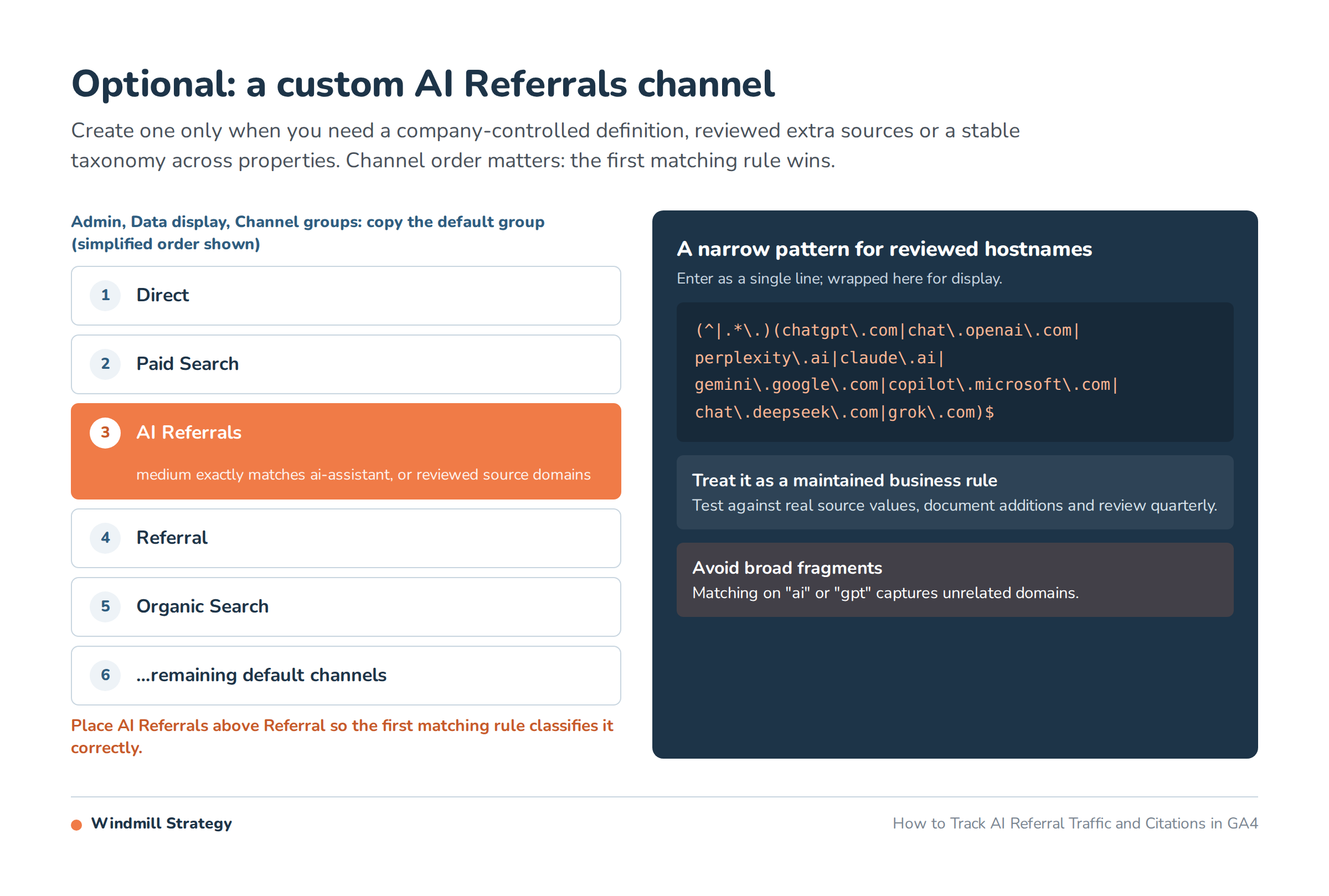
Step 4: Build reports around business questions
The most useful report is not “How many AI sessions did we get?” It is “Which AI-referred visits became meaningful industrial buying activity?” We recommend building three views:
AI referral trend
Use month, Session default channel group, and Session source / medium. Include sessions, users and engaged sessions. Annotate the May 2026 native-channel launch and any custom-rule change so reporting shifts are not confused with market shifts.
Landing-page quality
Use Landing page + query string with Session source / medium. Compare AI Assistant with Organic Search and Referral using:
- Engaged sessions
- Engagement rate
- Average engagement time per session
- Key events
- Session key event rate
Product pages, application content, technical guides and case studies often play different roles. A low-volume technical page can be valuable if it produces a qualified RFQ. The citation-ready content guide explains how to improve pages that attract useful AI referrals.
Qualified outcomes
Separate soft engagement from high-intent actions. A PDF view, CAD download, sample request, distributor search and RFQ should not all carry the same business meaning. Review lead quality with sales and connect the web event to lifecycle stages in the CRM.
Use your own baseline instead of a generic claim that AI traffic “converts better.” Small samples create volatile percentages, and conversion quality varies by source, page, market and offer.
Step 5: Carry attribution into the CRM
GA4 can show a key event, but an industrial marketer ultimately needs to know whether the visitor became a qualified opportunity. Preserve attribution beyond the form fill.
With consent and privacy requirements addressed, capture the landing page, campaign parameters and available document referrer in first-party storage or a data layer. Map those values into tested hidden form fields. Keep separate fields for original source and most recent source rather than overwriting one with the other.
Add a short self-reported question such as “How did you hear about us?” Give respondents a clear AI assistant option and retain free text. Self-reporting can reveal influence that click attribution misses, but it is not a replacement for behavioral data. Treat the two sources as complementary.
Then test the entire chain:
- Visit with a controlled campaign parameter.
- Submit a test form.
- Confirm the GA4 event and source values.
- Confirm the CRM fields and lifecycle mapping.
- Verify that sales can see and use the information.
The engineer research journey explains why this matters. Technical buyers can move between search, AI answers, vendor pages and sales validation; last-click attribution sees only one transition.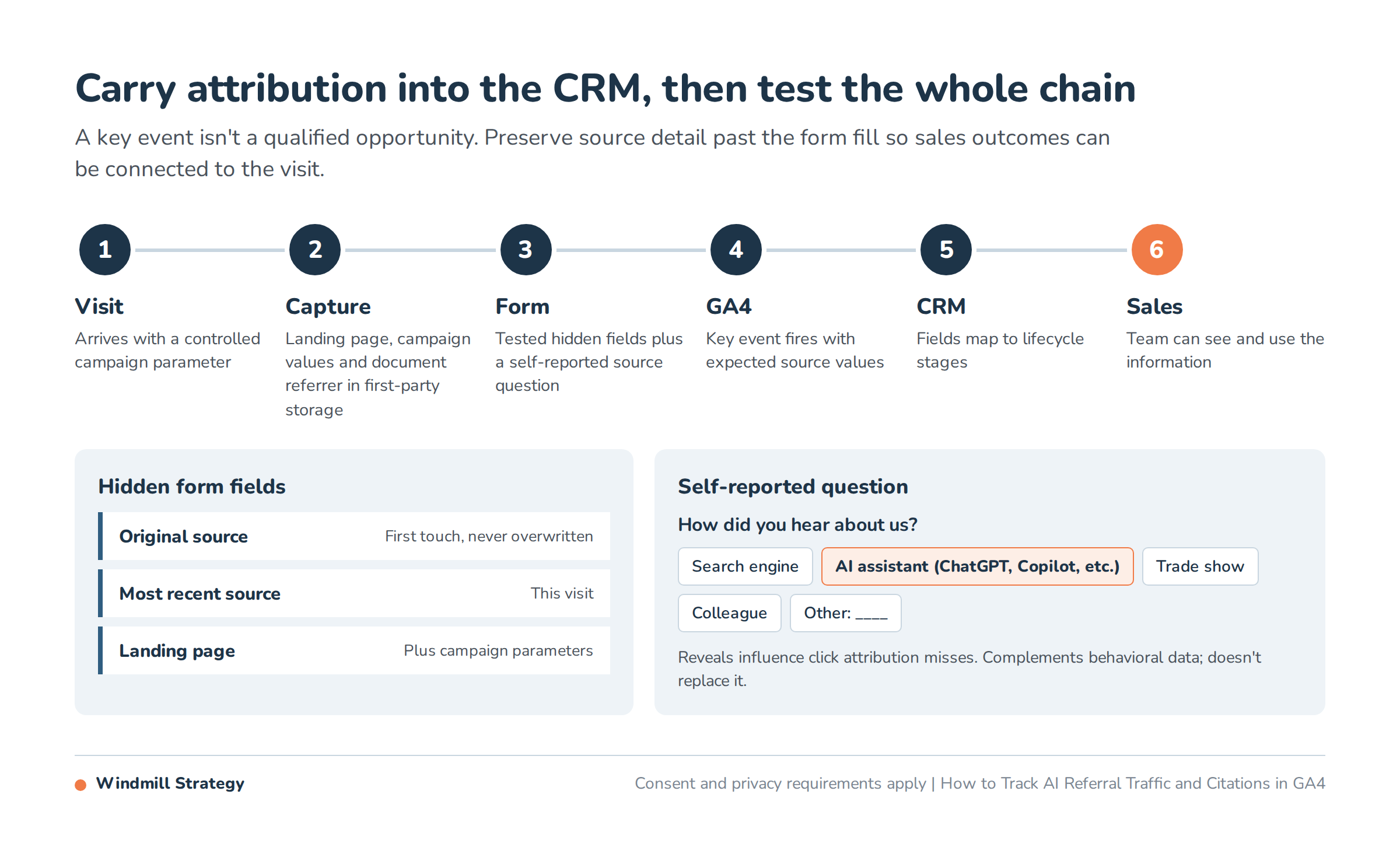
Step 6: Measure citations outside GA4
Google Search Console
As of August 31, 2026, Google says its generative AI report is available to websites worldwide. It reports impressions from AI Overviews and AI Mode, grouped by page, country, date and device.
The limitations are important:
- It reports impressions, not clicks or click-through rate.
- It does not provide a query dimension.
- Page data is generally assigned to the canonical URL.
- The data is also included in the overall Web performance report, so do not add the two totals together.
- A property may not show the report when it lacks sufficient impressions or has been excluded from Search generative AI features.
Use it to answer which pages gain or lose Google generative visibility over time. Use GA4 Organic Search and CRM outcomes to evaluate downstream activity, without claiming a one-to-one connection Google does not expose.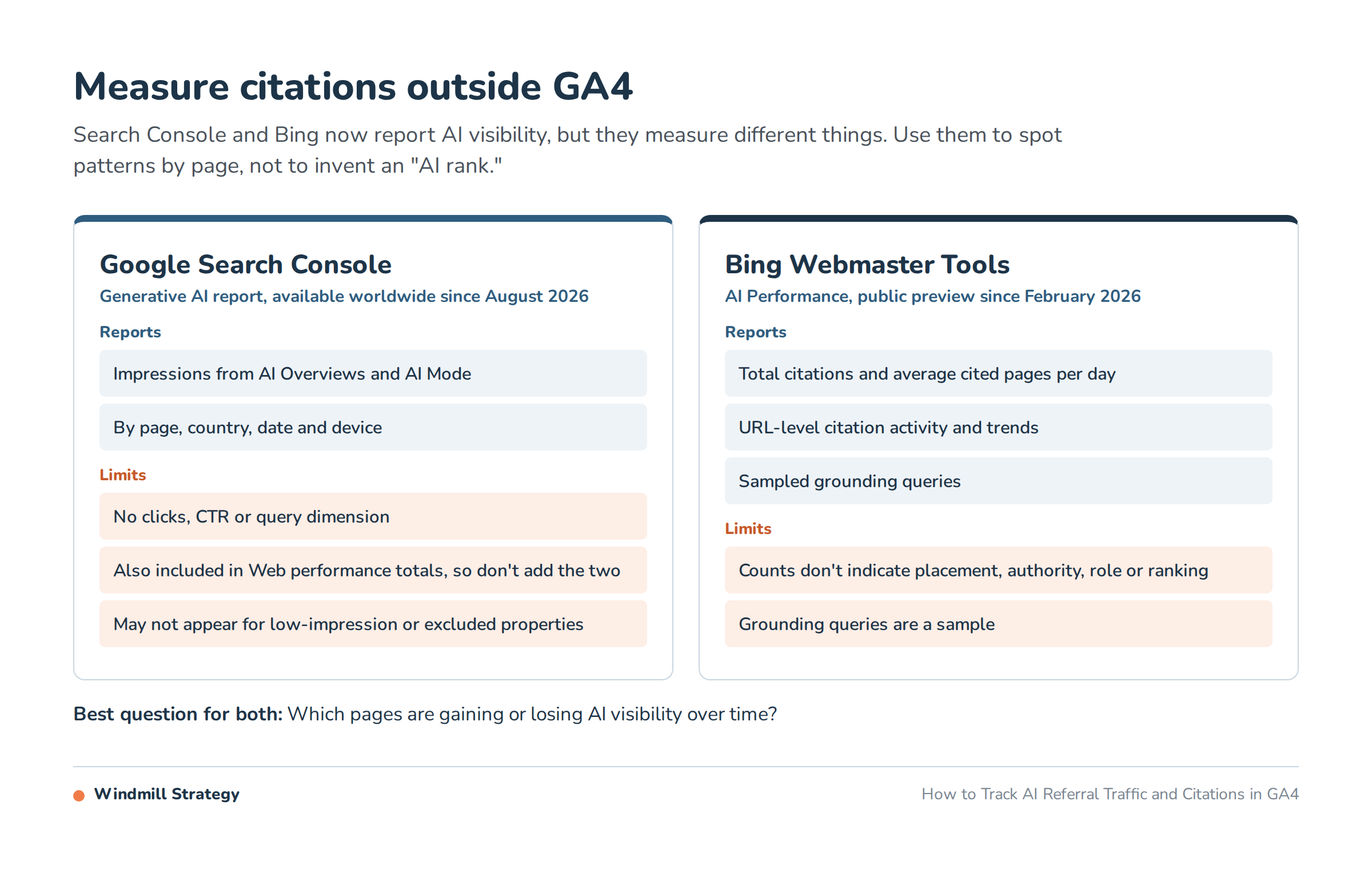
Bing Webmaster Tools
Bing introduced AI Performance in public preview in February 2026. The dashboard covers Microsoft Copilot, AI-generated Bing summaries and select partner integrations. It reports total citations, average cited pages per day, sampled grounding queries, URL-level citation activity and trends.
Bing states that those counts do not indicate a page’s placement, authority, role or ranking within an answer. Grounding queries are a sample. Use the report to identify patterns and investigate pages, not to manufacture an “AI rank.”
ChatGPT and other assistants
OpenAI documents referral tracking through its ChatGPT UTM parameter, but a referral is still a click rather than a citation impression. For no-click visibility across assistants, maintain a controlled prompt sample:
- Use 15 to 25 real buying questions drawn from search, sales and support conversations.
- Cover problem framing, product selection, comparisons, specifications and supplier shortlisting.
- Record the exact prompt, product, model or mode, date, location assumptions and login state.
- Record linked citations, unlinked mentions, competitors and material inaccuracies separately.
- Repeat the same process on a fixed cadence and avoid overreading one run.
Call the resulting metric a sampled citation rate or prompt-panel visibility. It is directional because responses can vary by model, personalization, geography and time. No third-party tracker has access to every answer a buyer sees.
The measurement funnel
| Funnel stage | Primary metric | Primary system | What it establishes | What it cannot establish |
| Visibility | Google AI impressions, Bing citations, sampled mentions | Search Console, Bing, prompt panel | Your content or brand appeared in the measured surface | Whether a buyer noticed or trusted it |
| Referral | AI Assistant sessions by source | GA4 | A person clicked and arrived with attributable source data | Unclicked citations or stripped attribution |
| Engagement | Engaged sessions and landing-page behavior | GA4 | The visit interacted with website content | Buying intent or offline research by itself |
| Conversion | RFQs, samples, CAD downloads and key events | GA4 and forms | The visitor completed a defined action | Lead quality or revenue by itself |
| Pipeline | Qualified leads, opportunities and revenue | CRM | Measured commercial outcomes | Perfect causal credit across every touchpoint |
| Influence | Self-reported source and assisted-path evidence | CRM and surveys | Additional buyer-reported context | A complete, bias-free attribution record |
What Windmill’s client data shows
Our case study for Panel Built illustrates why volume and business value must be read together. Following a coordinated program spanning high-intent content, internal links, structured data, conversion paths and technical SEO, its keywords appeared in nearly 600 Google AI Overviews and ChatGPT referral sessions rose 61% year over year. Over the same period, organic sessions declined 20% as targeting shifted toward lower-volume intent, while organic contact submissions rose 122%, dealer submissions rose 600% and file-download conversions rose 206%. See the Panel Built case.
Those results do not prove that one schema field caused an AI citation. They show the value of measuring visibility, source traffic and high-intent outcomes as one connected program.
FasTest began with inconsistencies after its move from Universal Analytics to GA4. Windmill corrected tracking, built reporting dashboards, trained the team and combined those changes with navigation, content, SEO and performance improvements. One month after the website updates, conversions were 55% higher than the prior reporting period. The FasTest case is another reminder that trustworthy measurement and website improvement reinforce each other; analytics setup alone did not create the lift.
A practical reporting cadence
Monthly: Review AI Assistant sessions by source, landing-page quality, key events, CRM leads, Google generative impressions and Bing citation trends. Investigate changes large enough to affect decisions.
Quarterly: Review qualified opportunities, pipeline, the controlled prompt sample and material inaccuracies. Update source rules only when evidence supports a change.
After major changes: Revalidate tagging, forms, redirects, consent, cross-domain behavior and channel definitions after a redesign, CMS migration, CRM integration or analytics release.
Every executive summary should state the measurement boundary: which surfaces are included, the date range, whether prompt data is sampled and which outcomes are attributable rather than inferred.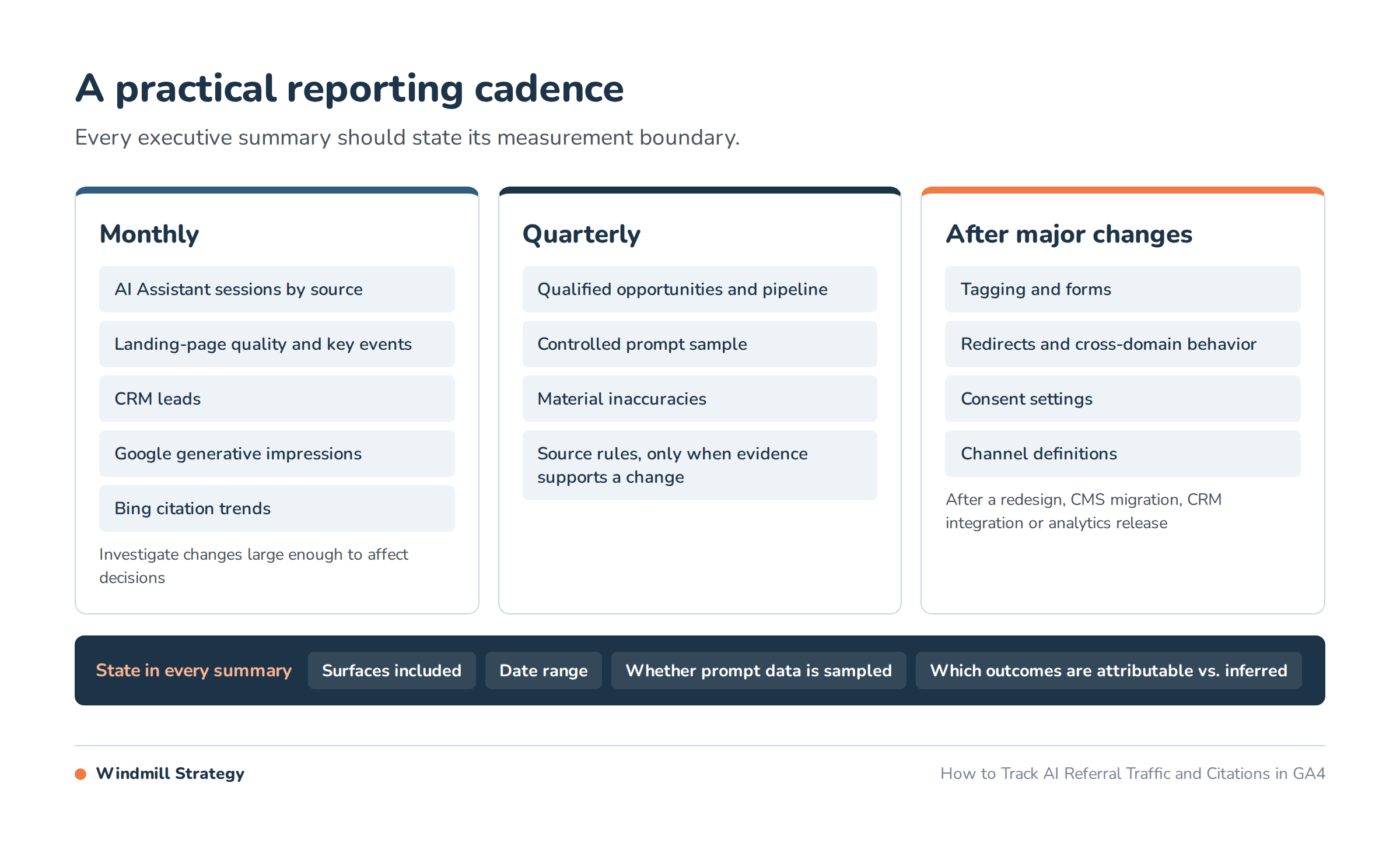
Frequently asked questions
Can GA4 track AI citations?
No. GA4 records website activity after a measurable visit begins. Use Search Console and Bing Webmaster Tools for supported AI visibility data, then use a controlled prompt sample for surfaces without publisher-level citation reporting.
Do we still need a custom channel?
Not always. Start with GA4’s native AI Assistant channel. Add a custom group when you need reviewed extra sources, cross-property consistency or a documented internal taxonomy.
Where are Google AI clicks?
GA4 classifies clicks from Google AI Overviews and AI Mode as Organic Search. Search Console separately reports impressions for those generative features but does not expose their clicks or queries in that report.
Why does AI traffic show as Direct?
When a visit arrives without usable campaign or referrer information, GA4 may classify it as Direct. App handoffs, privacy controls and redirects can remove that information. Do not reassign Direct traffic without evidence.
What is a good AI conversion rate?
There is no useful universal benchmark for a niche industrial company. Establish a source-specific baseline, require enough observations and compare qualified leads and pipeline—not only percentage changes from small counts.
Build a defensible baseline
AI search reporting is now more actionable than it was a year ago. The durable approach is still disciplined measurement: use the native channel before custom rules, preserve source detail, connect key events to CRM outcomes and keep citation visibility separate from website traffic.
Windmill’s analytics services connect GA4, Search Console, Bing and CRM reporting to the questions industrial sales teams actually need answered. For a focused implementation review, see our GA4 audit services.